You can integrate your Agent Response account with the Reapit CRM, allowing for lead data to be sent int Reapit;
- Imports properties - properties added in Reapit are synced across into Agent Response
- Add form enquiries - when a form is completed, the data is matched to a lead based on their on email address and phone number
Connecting Agent Response to your Reapit account
Log in to your Reapit account and go to the apps section to enable the Agent Response integration.
https://marketplace.reapit.cloud/apps/d25d9ad0-1065-4981-b714-f4dbaf76b73c
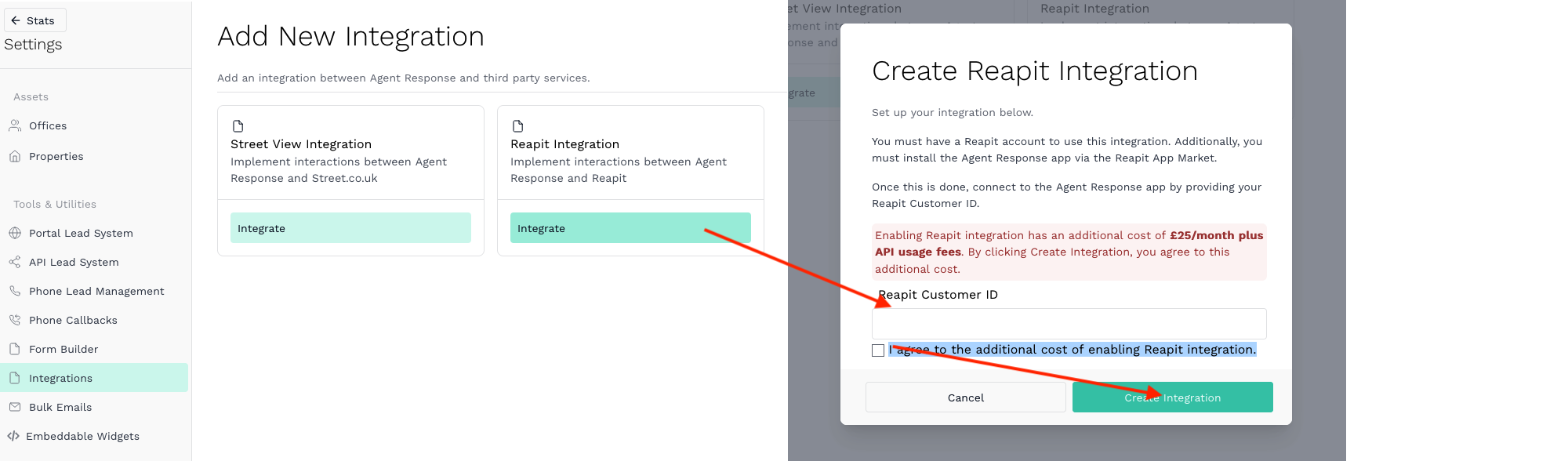
Log in to your Agent Response account and go to the ‘Create Integration’ page (https://agentresponse.app/settings/team-integrations).
Choose Reapit Integration and add your Reapit Customer ID and tick the box about agreeing to the additional costs for enabling Reapit.
Connecting Reapit branches with Agent Response Offices
After connecting your Reapit account in Agent Response, click the ‘+ Office Integration’ button to set up your first office integration.
Match the appropriate Reapit branch and Agent Response office.
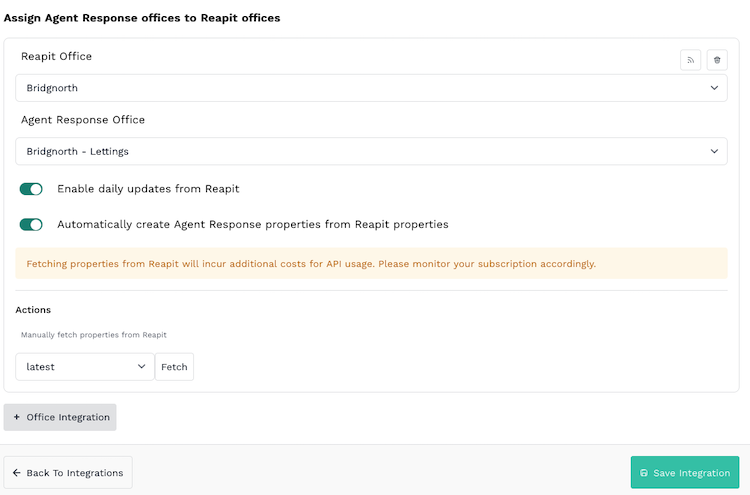
Once you are happy with your settings make sure to click save.
Repeat this process for every office that you wish to integrate with Reapit.
|
Rate this Topic:
|
|||
|
